
Over the past four weeks we’ve covered the hardware: SenseID, SenseBLE, and SenseNFC evaluation boards. If you’ve been following along with KL-OSIRIS, you’ve seen live sensor data from battery-free tags on your screen.
Now the question changes. KL-OSIRIS is an evaluation tool — it reads one tag at a time, with manual selection. That’s exactly right for proving the technology works in your environment. It’s not enough for a real deployment where you need to read multiple tags, automate the process, and integrate with your systems.
When you’re ready to go beyond evaluation, you need the SENSEID SDK.
This post explains what the SDK gives you, what it doesn’t, and how to plan the custom development that every production deployment requires.
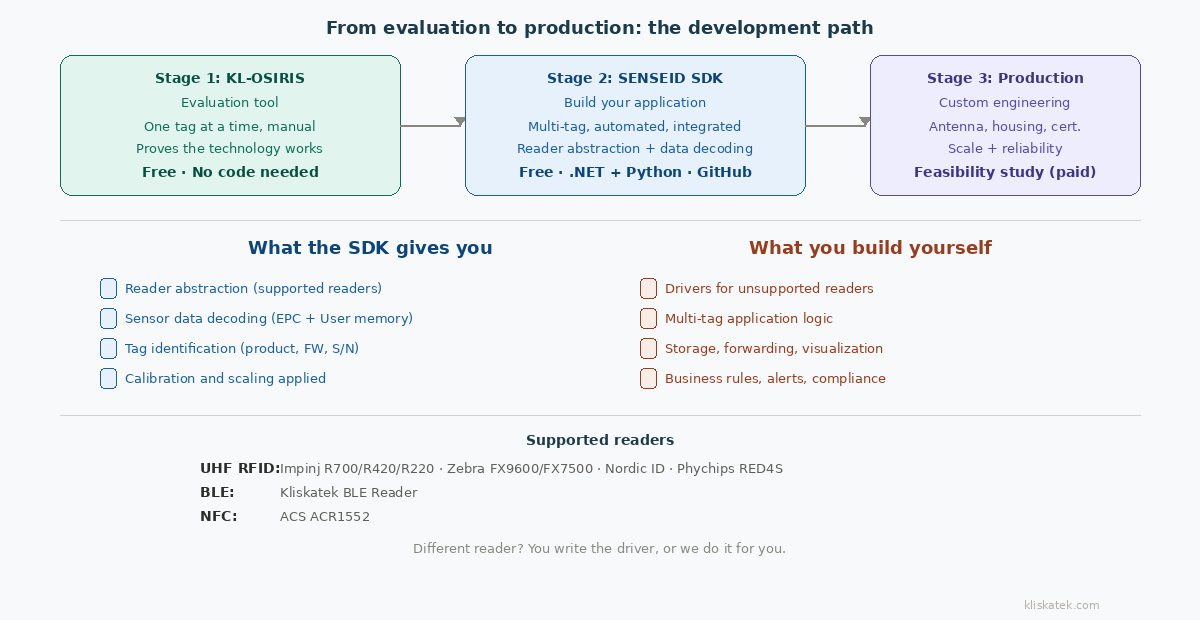
1) What KL-OSIRIS is (and isn’t)
Let’s set the right expectation upfront, because this saves everyone time.
KL-OSIRIS is an evaluation tool. It connects to a reader, reads one sensor tag at a time, displays the decoded measurement on screen, charts the time series, and exports data to CSV or Parquet. It also demonstrates features like MQTT and NATS forwarding — useful for proving that your broker can receive sensor data, not for running a production data pipeline. If you have one eval tag and want to see whether it works with your reader at 2 metres inside a metal cabinet, KL-OSIRIS is exactly the right tool. That’s what it’s for.
KL-OSIRIS is not a production application. It doesn’t automatically cycle through multiple tags. The selection between tags is manual. It doesn’t run headless. It doesn’t handle application logic — alerts, thresholds, multi-zone management, ERP integration. No evaluation tool should try to do these things, because every production deployment is different.
The bridge from evaluation to production is the SENSEID SDK.
2) What the SENSEID SDK gives you
The SDK is open source, free, and available in two languages:
.NET — github.com/kliskatek/senseid-sdk-net
Python — github.com/kliskatek/senseid-sdk-py
Here’s what it handles:
Reader abstraction for supported readers. The SDK provides a unified interface for connecting to and running inventories on the readers we’ve already integrated — Impinj, Zebra, Nordic ID, Phychips, ACS (NFC), and our own BLE reader. You write your application against the SDK’s interface, and it handles the reader-specific protocol underneath.
Sensor data decoding. This is where the SDK saves you the most time. Our sensor tags encode measurement data in the EPC memory (our default approach) or in User memory. Parsing that data correctly — extracting the right bits, applying the right scaling, handling calibration, interpreting different sensor types — is non-trivial work that you don’t want to figure out from scratch. The SDK does it and returns structured values: temperature in °C, humidity in %RH, acceleration in g. Numbers you can use directly.
Tag identification. The SDK recognises Kliskatek sensor tags and tells you which product it is, what magnitudes it measures, its firmware version, and its serial number.
These three things — reader abstraction, sensor data decoding, and tag identification — represent weeks of development time that you don’t have to spend. That’s the real value of the SDK.
3) What the SENSEID SDK does not give you
This section is as important as the previous one. We’d rather tell you now than have you discover it mid-project.
Drivers for readers we haven’t integrated. Every UHF RFID reader manufacturer has their own API — Impinj’s LLRP/Octane SDK, Zebra’s 123RFID SDK, Nordic ID’s NUR API, and so on. The SENSEID SDK includes drivers for the readers listed above. If your deployment uses a different reader — a ThingMagic, a Chainway handheld, or a reader from a manufacturer we haven’t worked with — you’ll need to write the driver that connects that reader’s API to the SDK interface. The interface is documented, but the driver work is yours. This is not a limitation we can abstract away: reader APIs are genuinely different from each other, and each one requires specific integration work.
Multi-tag application logic. The SDK gives you the tools to read tags and decode sensor data. How your application manages multiple tags — which to read, in what order, how often, what to do with each reading, how to handle a tag that’s temporarily out of range — is specific to your application and yours to build. A cold chain system reading 200 tags at a dock portal has completely different logic from a maintenance app reading one tag at a time with SenseNFC. The SDK serves both; it can’t be both.
Storage, forwarding, and visualisation. Where the data goes after the SDK decodes it is your architecture. Database, MQTT broker, REST API, CSV file, dashboard — the SDK delivers decoded sensor values; everything downstream is your code.
Business rules. Alerts, thresholds, escalation, compliance reporting, audit trails — these depend on your industry, your facility, and your regulatory requirements. The SDK gives you numbers; the business context is yours.
4) The development path: evaluation → SDK → production
Here’s the typical path for teams that go from evaluation to deployed system:
Stage 1: Evaluation with KL-OSIRIS. Buy eval tags (50 € each), download KL-OSIRIS (free), connect your reader, validate that battery-free sensing works in your environment. One tag at a time, visual feedback, CSV export for your report. This proves the concept and gives you data to share with your team. Duration: days to weeks.
Stage 2: Prototyping with the SDK. Clone the SDK repo, run the examples, and start building your application. Connect to your reader through the SDK (if supported) or write a driver (if not). Read multiple tags, decode the data, integrate with your systems. This is where you discover the real-world challenges: inventory cycle timing, tag population management, BLE burst handling, error recovery. Duration: weeks to months, depending on your team’s RFID/BLE/NFC experience and application complexity.
Stage 3: Production engineering. The prototype works in the lab. Now it needs to work reliably, at scale, in a real environment. The antenna placement needs optimising. The reader configuration needs tuning. The sensor tags need custom housings for your specific mounting conditions. The edge cases need handling. The system needs to survive power cycles, network outages, and a forklift driver who doesn’t care about your RF field geometry.
Most teams can handle Stages 1 and 2 with their own resources plus the SDK. Stage 3 is where the decision gets interesting: do it yourself, or bring in help.
5) When to talk to us
The SDK and KL-OSIRIS are free because we want the barrier to evaluation and prototyping to be as low as possible. The more people who try battery-free sensing, the more people discover it works.
But there’s a point where the engineering gets specific enough that doing it alone is slower and riskier than doing it together. Here are the signals:
“I need a sensor you don’t have on an eval board.” Load cell, strain gage, pressure transducer, pH probe — the sensing platform supports them, but custom tag design is RF engineering work that requires lab testing and iteration. That’s our core competence.
“The antenna doesn’t work in my installation.” Custom antenna design for specific environments (metal proximity, sealed enclosures, particular orientations) is the kind of problem we’ve solved hundreds of times. It looks simple on paper and is surprisingly unforgiving in practice.
“My reader isn’t supported.” We can develop the reader driver or build a custom integration layer for your hardware.
“I need a housing that survives my environment.” IP-rated enclosures, ATEX certification, specific materials — we coordinate this with our mechanical and testing partner network.
“I need help with the full architecture.” That’s a feasibility study. We analyse your requirements, design the architecture from tag to system, estimate costs at volume, and deliver a technical recommendation with a business case. Feasibility studies are paid engagements (typically 5-20K€) and they’re the most efficient path from “the prototype works” to “I have a production plan with realistic numbers.”
6) Sensor data encoding: how it works under the hood
Whether you use KL-OSIRIS or the SDK, the sensor data on the tag is encoded in one of two ways. Understanding this helps you troubleshoot and build robust parsers if you go beyond the SDK.
EPC-embedded (our default). Sensor data is encoded inside the EPC/UII memory. A standard inventory command retrieves both tag identity and sensor value in one operation — fast, low-power, no extra read commands. The SDK and KL-OSIRIS decode this automatically.
User memory (legacy and specific cases). Sensor data is stored in User memory (MB11), requiring a separate read command. Slower, but allows richer payloads and keeps the EPC identity stable.
For the full technical comparison, see our blog post on EPC Gen2 + Sensor Integration: Two Standards-Compliant Paths.
7) Getting started
If you’re still evaluating: Download KL-OSIRIS (free). Start here.
If you’re ready to build:
Clone the repo, follow the README, run the examples.
If you’re stuck — on reader integration, application architecture, or the jump from prototype to production: Contact us. We’d rather help you get unstuck than have you abandon the project at the SDK stage. A quick conversation costs nothing and might save you weeks.
Next week: “Three Protocols, One Sensing Platform: Architecture Patterns for Real Deployments” — how SenseID, SenseBLE and SenseNFC work together in multi-protocol deployments.