
Last week we published a step-by-step guide to your first battery-free measurement with KL-OSIRIS. If you followed along, you know the workflow: connect a reader, place a tag, see live data.
This week we go deeper into the SenseID evaluation board family — the five boards available today, what each one measures, where each one fits, and practical advice for getting the most out of your evaluation.
All SenseID boards share the same architecture: UHF RF energy harvesting, EPC C1G2 communication, standard dipole PCB antenna, and compatibility with any commercial EPC C1G2 reader. No custom commands are needed — the sensor data is encoded in the EPC or user memory, which means your existing RFID middleware can read it with minor configuration changes.
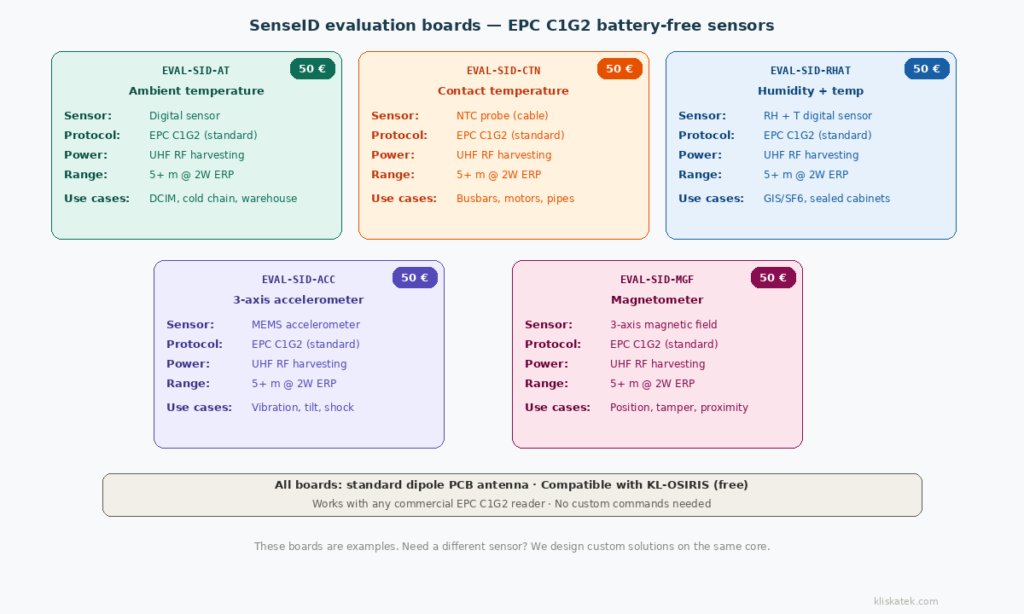
1) EVAL‑SID‑AT: Ambient temperature
What it measures. Air temperature around the tag, using a calibrated digital temperature sensor.
When to use it. Environmental monitoring where you need to know the temperature of the space, not a specific surface. Data centres (rack-level temperature mapping), cold chain (cold rooms, staging areas, transit zones), warehouses (ambient conditions across zones), greenhouses, and any application where “what’s the temperature here?” is the question.
Practical tip. The sensor measures the temperature of the air around the tag, not the temperature of whatever the tag is attached to. If you mount it on a metal surface, the reading will be influenced by the surface temperature — which might be what you want, or might not. For true ambient readings, give the tag some standoff from the mounting surface, or position it where air can circulate around the sensor.
Range. Over 5 metres with a standard 2W ERP setup. In our experience, most evaluation setups start at 1-2 metres and work outward.
2) EVAL‑SID‑CTN: Contact temperature (NTC)
What it measures. Surface temperature via a cable-connected NTC thermistor probe. The probe touches the surface you want to monitor; the tag can be positioned for optimal RF exposure separately.
When to use it. This is the board for monitoring equipment, not environments. Busbar temperature in switchgear and distribution panels, motor housing temperature, pipe surface temperature, transformer casing temperature — anywhere you need to know how hot a specific component is.
Why this one matters for high voltage applications. In switchgear and power distribution equipment, hot spots on busbars are early indicators of loose connections or degradation. Detecting them before they cause a failure is the core use case for condition-based maintenance in utilities. The NTC probe can be routed through the enclosure to touch the busbar while the tag itself sits where the RF field can reach it — solving the “metal enclosure” challenge that makes direct mounting difficult.
Practical tip. The cable between the NTC probe and the tag board gives you design flexibility — the probe goes where the heat is, and the tag goes where the energy is. This separation is important: the sensor and the antenna have different placement requirements. In a real deployment, the probe would be permanently bonded to the monitored surface, and the tag would be positioned for best RF field exposure.
3) EVAL‑SID‑RHAT: Relative humidity and temperature
What it measures. Both relative humidity (RH%) and air temperature in a single tag, using a combined digital sensor.
When to use it. Applications where moisture matters as much as or more than temperature. Gas-insulated switchgear (SF6 or alternative gases — moisture ingress indicates seal degradation), sealed electronic cabinets, cold rooms where condensation is a risk, clean rooms, food storage, pharmaceutical storage, and any environment where humidity control is critical.
Why humidity matters in energy applications. In gas-insulated equipment, moisture inside the sealed compartment accelerates insulation degradation and can lead to partial discharge. Monitoring humidity alongside temperature gives early warning of seal failures — long before the gas quality deteriorates to a point where the equipment’s insulating performance is compromised.
Practical tip. Humidity sensors need airflow around the sensing element. If the tag is mounted in a sealed space (which is often the point), make sure the sensor side isn’t pressed against a surface. The RH measurement responds more slowly than the temperature measurement — give it a few minutes to stabilise after placement before drawing conclusions.
4) EVAL‑SID‑ACC: 3-axis accelerometer
What it measures. Acceleration along three axes (X, Y, Z), which translates to vibration, tilt, shock, and orientation.
When to use it. Condition monitoring for rotating machinery (vibration signatures that indicate bearing wear or imbalance), structural health monitoring (tilt changes in bridges, buildings, or infrastructure), shock detection for fragile goods in transit, tamper detection (has this asset been moved?), and orientation monitoring (is this container upright?).
Practical tip. The accelerometer measures at the moment of interrogation — it’s a snapshot, not a continuous waveform. For vibration analysis, you need to understand that you’re sampling the acceleration at the read rate, not capturing a full frequency spectrum. This is sufficient for detecting changes in vibration level over time (trending) and for tilt/orientation, but not for detailed frequency analysis. If your application needs vibration FFT, battery-free sensing may not be the right fit — and we’ll tell you that honestly.
5) EVAL‑SID‑MGF: Magnetometer
What it measures. Magnetic field strength along three axes, using a 3-axis magnetometer.
When to use it. Position detection (is a door open or closed? is a valve in the ON or OFF position?), tamper detection (has a magnet been moved or removed?), proximity sensing, compass heading, and current sensing (magnetic field around a conductor is proportional to current flow).
Practical tip. The magnetometer is very sensitive to nearby ferrous materials and permanent magnets. During evaluation, keep the tag away from magnetic sources unless that’s what you’re trying to measure. For position or tamper detection, the typical approach is to place a small permanent magnet on the moving part and the sensor tag on the fixed part — the change in magnetic field tells you whether the position has changed.
6) Which board should you buy first?
This depends entirely on your application, but here’s a practical decision guide:
“I’m monitoring an environment (room, cabinet, zone).” Start with EVAL-SID-AT (temperature). It’s the simplest board to evaluate — the reading is intuitive, the test is straightforward (compare with a reference thermometer), and temperature is the most universally relevant measurement. If humidity matters too, go directly to EVAL-SID-RHAT.
“I’m monitoring a piece of equipment (motor, busbar, pipe).” Start with EVAL-SID-CTN (contact temperature). The NTC probe lets you measure the surface temperature of the actual component, which is more useful for condition monitoring than ambient temperature. If vibration is your primary concern, go with EVAL-SID-ACC.
“I’m not sure yet, I just want to see the technology work.” EVAL-SID-AT. It’s the most straightforward evaluation — place the tag near the reader, see the temperature. From there, you can move to more specialised boards once you’ve validated the basics.
“I need multiple magnitudes.” Buy multiple boards. At 50 € each, the investment is modest. Having two or three different boards lets you run a more complete evaluation and gives you a better sense of which measurements matter most for your specific application.
7) What these boards are — and what they aren’t
These are evaluation boards, not production-ready tags. They’re designed for one purpose: to let you validate that battery-free sensing works in your environment, with your reader, for your application. They’re PCB-format boards with standard dipole antennas — no enclosure, no IP protection, no custom form factor.
A production solution will look very different: custom antenna optimised for your specific mounting environment, enclosure designed for your IP and environmental requirements, sensor selected for your specific measurement needs, and firmware tailored to your data format and read patterns.
The path from evaluation board to production solution goes through a feasibility study — a paid engagement where we analyse your specific requirements, design the antenna and enclosure concept, estimate costs at volume, and deliver a technical recommendation. But that conversation starts here, with a 50 € board and a free software download.
These boards are also examples of what the platform can do, not the limit of what’s possible. The SenseID architecture supports any sensor that fits within the tag’s energy budget. If you need a load cell for weight, a strain gage for deformation, a pressure transducer, a pH probe, or an e-ink display — the sensing core is the same. The evaluation boards show you the principle; the custom solution delivers your application.
8) Getting started
Order evaluation boards: SenseID product page — all boards 50 € each, ships from Hernani, Gipuzkoa.
Download KL-OSIRIS: Resources page — free, no registration, Windows/Mac/Linux.
Follow the tutorial: Getting Started with KL-OSIRIS — step-by-step from unboxing to first measurement.
Build your own application: SENSEID SDK — .NET and Python libraries, free, documented.
Ready to discuss a custom solution? Contact us — tell us what you need to measure, where, and what your constraints are. We’ll tell you which board to start with and whether a feasibility study makes sense for your application.
Next week: “SenseBLE Evaluation Guide: BLE Burst Tags — Same Sensors, Different Infrastructure” — the same walkthrough for our BLE-based evaluation boards.