
This is the third and final part of our evaluation guide trilogy. Over the past two weeks we’ve covered SenseID (EPC C1G2) and SenseBLE (BLE burst). Both of those lines use UHF RF energy harvesting and require some form of fixed infrastructure — an RFID reader or an RF transmitter plus BLE gateways.
SenseNFC is fundamentally different.
The sensor tag harvests energy from the NFC field generated by your smartphone. The same NFC field provides the data link. There is no UHF RF involved, no fixed reader, no gateway, no infrastructure to install. Your phone is the reader, the power source, and the data link — all in one device you already carry.
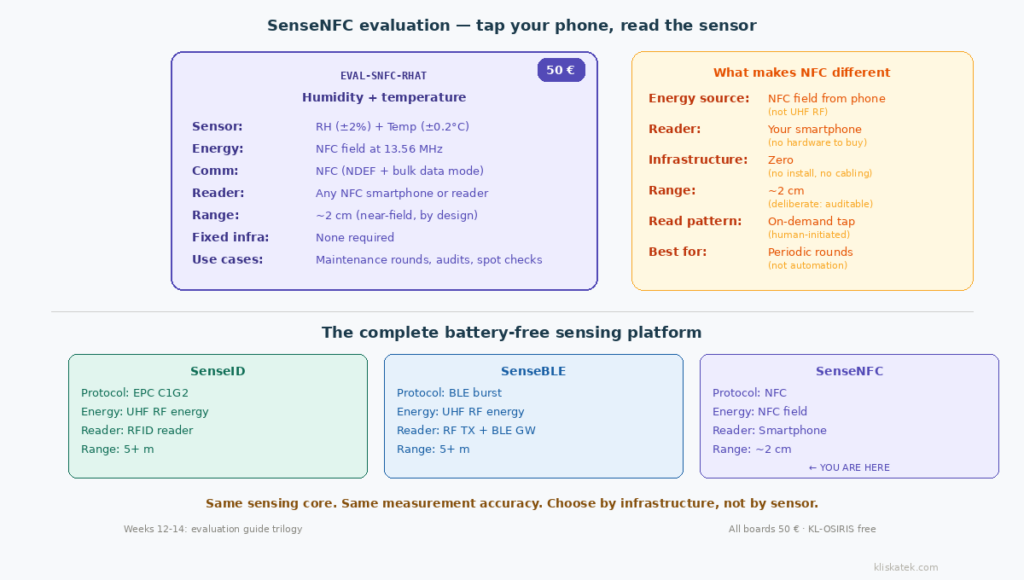
1) How SenseNFC works
The physics is simple but worth understanding, because it explains both the strengths and the limitations.
NFC operates at 13.56 MHz in the near-field. When your smartphone’s NFC antenna generates a field, a tag within a few centimetres can harvest enough energy from that field to power its electronics. Once powered, the tag reads the sensor, stores the measurement, and makes the data available to the phone through the NFC data protocol.
This is the same principle behind NFC payment cards and NFC tags — but instead of storing a URL or a payment token, the SenseNFC tag stores a live sensor measurement.
The key difference from SenseID and SenseBLE: the energy source is the NFC field at 13.56 MHz, not a UHF RF field at 868/900 MHz. This means no UHF reader or transmitter is needed — but the operational range is much shorter. NFC is near-field by definition: roughly 2 centimetres for reliable energy transfer and data exchange.
2) The EVAL‑SNFC‑RHAT
Currently one evaluation board is available in the SenseNFC family:
EVAL‑SNFC‑RHAT — Relative humidity and temperature. 50 €.
Specifications:
Relative humidity: 0 to 100% RH, ±2% RH accuracy, 0.01% RH resolution. Temperature: -40°C to 85°C, ±0.2°C accuracy, 0.01°C resolution.
These are excellent specifications — the temperature accuracy of ±0.2°C is notably better than many battery-powered industrial sensors. The humidity accuracy of ±2% RH is standard for high-quality industrial monitoring.
Two operating modes. The EVAL-SNFC-RHAT supports two data transfer modes depending on what your NFC reader can do. In NDEF mode, the sensor data is stored in standard NFC memory and readable by any NFC-capable device — including any smartphone with a basic NFC reader app. In bulk data transfer mode, the tag supports high-speed data transfer via block write operations for applications that need faster or more structured communication. Your reader needs to support block write for this mode.
For evaluation purposes, NDEF mode is the easiest way to start. Tap the tag with your phone, read the NFC memory, and the humidity and temperature values are right there.
3) Evaluating SenseNFC: what you need
A smartphone with NFC. Any modern Android or iPhone with NFC capability. For the best evaluation experience, install our free SenseNFC app (Google Play) — it’s designed specifically for our sensor tags and displays humidity and temperature readings directly on screen, decoded and formatted, with no raw data interpretation needed. You can also read the tag with any generic NFC reader app or your phone’s built-in NFC detection (the tag works in standard NDEF mode), but the SenseNFC app gives you a purpose-built, frictionless experience.
The EVAL‑SNFC‑RHAT tag. Order from our NFC sensors page. 50 €, ships from Hernani.
There is no step three. You don’t need a UHF RFID reader. You don’t need an RF transmitter. You don’t need a BLE gateway. A phone and a tag — that’s the complete evaluation setup.
This is the lowest barrier to entry of any battery-free sensor evaluation we offer.
4) The evaluation experience
Tap and read. Open the SenseNFC app on your phone and hold the EVAL-SNFC-RHAT tag near the NFC antenna (usually on the back of the phone, near the centre). The app energises the tag, reads the sensor, and displays humidity and temperature values directly on screen — no payload interpretation needed. The entire process takes about a second. If you prefer not to install the app, the tag also works in NDEF mode with any generic NFC reader, though you’ll see the raw data format instead of parsed readings.
Repeatable. Move the tag away, wait a moment, tap again. Each tap triggers a fresh energy harvest, a new sensor measurement, and a new data transfer. The values update in real time.
Test sensor response. Breathe on the tag to see humidity spike. Hold it in your hand to see temperature rise. Place it near a cold surface. The sensor responds quickly — within one or two taps you’ll see the change reflected in the data.
Range testing. Move the tag slowly away from the phone until the read fails. You’ll find that reliable reads happen within about 2 centimetres. This is by design, not a limitation to work around. The near-field range ensures that every read is deliberate — you had to physically bring the phone to the sensor, which creates an inherently auditable trail.
5) Where SenseNFC fits (and where it doesn’t)
This is the most important section. SenseNFC is not a replacement for SenseID or SenseBLE. It’s a complement for use cases where fixed infrastructure doesn’t make sense.
Where it fits perfectly:
Maintenance rounds. A technician walks a predefined route, tapping sensor tags at each monitoring point. The phone logs each reading with a timestamp and location. The near-field range guarantees that the technician physically visited each point — you can’t fake a tap from across the room. This is particularly valuable for compliance-driven monitoring where proof of presence matters.
Spot audits. A quality inspector checks specific points during an audit. No infrastructure to install before the audit, no equipment to carry beyond a phone, no readings to manually transcribe. Tap, read, next.
Environments where no fixed infrastructure is possible. Some facilities, especially those with strict electromagnetic compatibility requirements or frequently reconfigured layouts, can’t accommodate fixed readers or transmitters. SenseNFC works anywhere a person can physically reach the sensor with a phone.
Low-density monitoring. If you have 10-20 monitoring points spread across a large facility, installing fixed readers at each one is expensive relative to the number of sensors. SenseNFC lets you monitor all of them with a single phone during a periodic round.
Where it doesn’t fit:
Automated, continuous monitoring. If you need readings without human intervention — cold rooms that monitor 24/7, production lines that read sensors at every cycle, warehouses that track thousands of pallets — SenseNFC won’t work. It requires a person to bring a phone to each tag. Use SenseID or SenseBLE for this.
High-throughput reads. RFID readers can inventorise hundreds of tags per second from metres away. NFC reads one tag at a time from centimetres away. For bulk inventory or portal reads, SenseID is the right tool.
Remote or inaccessible sensors. If the sensor is embedded inside sealed equipment that a person can’t reach with a phone, NFC won’t work. SenseID or SenseBLE, with their longer UHF RF range, can reach tags inside enclosures that are within the RF field but physically inaccessible.
6) The hybrid deployment: NFC as a complement
The most practical architecture for many facilities is a combination:
SenseID or SenseBLE at fixed touchpoints where automated, continuous monitoring justifies the infrastructure investment — dock doors, cold rooms, critical equipment.
SenseNFC at periodic monitoring points where a technician visits on a schedule — equipment checks, environmental spot reads, compliance audits, locations where fixed infrastructure is impractical.
Both data sources feed the same middleware with the same data format. The downstream system doesn’t need to know whether the humidity reading came from an RFID portal or an NFC tap — it’s the same number from the same type of sensor.
7) The trilogy summary: choosing your line
You’ve now seen all three evaluation guide posts. Here’s the complete decision framework:
| SenseID | SenseBLE | SenseNFC | |
|---|---|---|---|
| Energy | UHF RF (868/900 MHz) | UHF RF (868/900 MHz) | NFC field (13.56 MHz) |
| Communication | EPC C1G2 backscatter | BLE advertising burst | NFC |
| Reader | RFID reader | RF TX + BLE gateway | Smartphone |
| Range | 5+ metres | 5+ metres | ~2 cm |
| Infrastructure | Fixed (readers + antennas) | Fixed (TX + gateways) | None (phone) |
| Read pattern | Deterministic | Event-driven | On-demand tap |
| Reader cost | Higher | Lower | Zero (phone) |
| Best for | Existing RFID, automation | Greenfield, cost-sensitive | Maintenance, audits |
| Boards available | 5 (AT, CTN, RHAT, ACC, MGF) | 4 (AT, RHAT, ACC, MGF) | 1 (RHAT) |
| Price per board | 50 € | 50 € | 50 € |
The sensor is the same across all three lines. The measurement is the same. The choice is about how the data reaches your system and what infrastructure that requires.
8) Getting started with SenseNFC
Order the EVAL‑SNFC‑RHAT: NFC sensors page — 50 €.
Install the SenseNFC app: Google Play — free, decodes sensor data directly on your Android phone.
Download KL-OSIRIS: Resources page — free, now supports all three families (SenseID, SenseBLE, SenseNFC). Use for PC-based logging and CSV export.
Try with your phone first: tap the tag, see the reading. No software installation needed for a first test.
Need a different sensor on NFC? The EVAL-SNFC-RHAT measures humidity and temperature. If your application needs a different magnitude — temperature only, pressure, accelerometer — contact us. The SenseNFC platform supports the same sensor range as SenseID and SenseBLE. The RHAT is the first board in the family, not the last.
Ready for a custom NFC sensor solution? Get in touch — tell us what you need to measure and how your maintenance or inspection process works. We’ll design a solution that fits.
Next week: “SENSEID SDK: Building Custom Applications in .NET and Python” — for developers who want to integrate sensor data from any of our three lines into their own systems.