
Insights · Kits and software · 23 November 2026
A Changing EPC: Why Your Reader Sees a New Tag Every Second
You put one evaluation tag in front of the reader, start an inventory, and the list starts to grow. Ten entries, then forty, then more, from one tag on the desk. Nothing is broken. You are looking at a changing EPC, and on our SenseID tags that is how the measurement reaches you.
We wrote about the two standard ways to carry sensor data over EPC Gen2 from the side of whoever designs the system. This post is for the first afternoon with a kit. It covers what the list means, which part of it is the tag, and what to settle before a pilot.
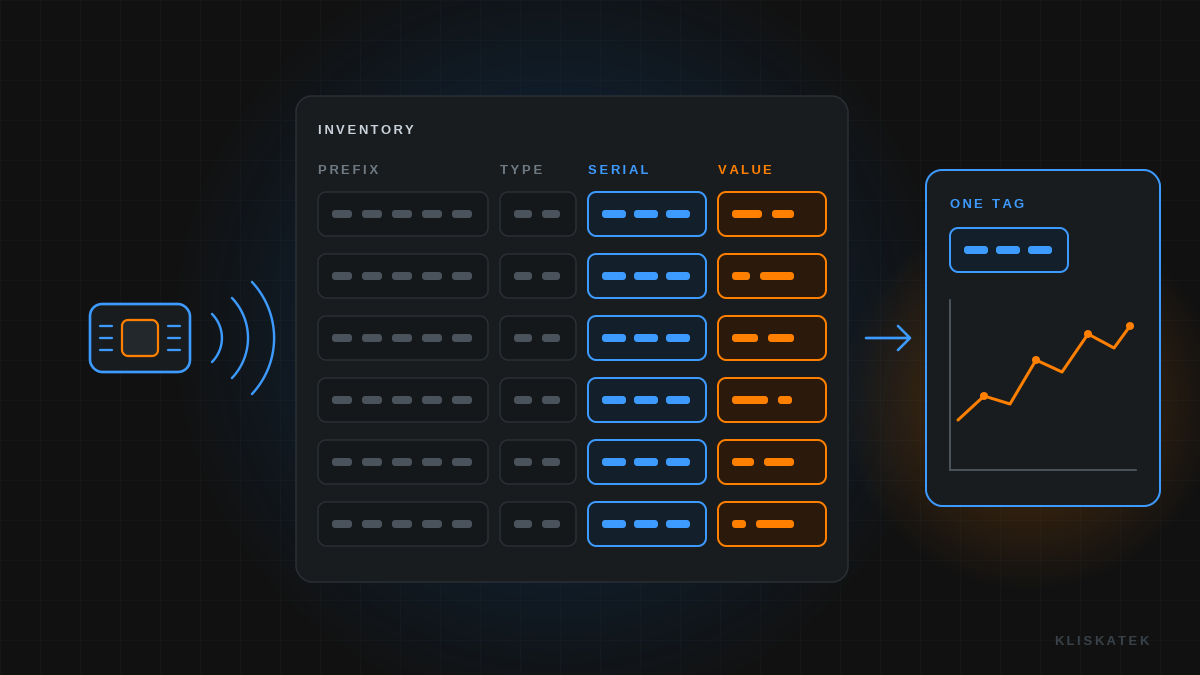
Why a sensor tag has a changing EPC
An ordinary RFID tag has an EPC that works like a name. Somebody writes it once and it stays. A battery-free sensor tag has a measurement to deliver, and the cheapest place to put it is the EPC itself.
The tag harvests energy from the reader. When it has stored enough, it takes a measurement, updates its EPC with the new value and answers the next inventory round. A standard inventory then brings back identity and value together. There is no Read command and no extra energy spent at the tag.
So the EPC changes every time the value does. Depending on how much power reaches the tag, that happens from once to several tens of times per second. To the reader, each new value looks like a tag it has never seen.
Which part of the EPC is the tag
The EPC is not one number. On our SenseID boards it is a short sequence of fields, and only the last one moves.
- A fixed prefix that says the tag is ours: a header byte and our enterprise number. It is the same on every board.
- The type and the version, which say which board it is.
- A serial number, which says which unit it is. This is the part that stays.
- The measurement, at the end. This is the part that changes.
The exact positions and the conversion to units are in the datasheet of each board, for example the contact temperature tag. The rule is general, though. Identify the tag by its serial number, not by its whole EPC.
The EPC Tag Data Standard is the reference for how an EPC is put together. The header byte at the front of ours is there to avoid a clash with the standard formats.
What a standard reader does with a changing EPC
Most reader software assumes that an EPC is a name. That assumption turns a working tag into a list of puzzles.
- The tag count climbs. The unique tag counter is counting readings, not tags.
- Tags seem to come and go. If the software reports a tag as gone when its EPC stops answering, every old value looks like a tag that left.
- Filters drop the tag. A filter or an allow list built from the EPC you saw first matches only that one reading.
- Databases grow a row per reading. Anything keyed on the EPC files every measurement as a new asset.
And if the list stays empty, check the reader mode before you blame the tag. Our SenseID boards only answer inventories that run with a BLF of around 270 kHz and Miller 4 modulation. A reader set to another link profile will not see them at all.
The fix is a parser, not a reader setting
Apart from that mode, nothing on the reader needs to change. What changes is the first piece of software that reads the EPC.
Split the EPC into its fields, use the serial number as the key, and convert the last field with the formula in the datasheet. Those are the minor configuration changes our SenseID evaluation guide mentions, and in most middleware they take a few lines.
You do not have to write them on day one. KL-OSIRIS decodes the EPC and shows you the measurement. The SenseID SDK tells you which product each tag is, its firmware version and its serial number. Start there, and write your own parser once you know what you need from it.
What a changing EPC means for a pilot
On the bench, a changing EPC is a surprise that lasts an afternoon. In a pilot it becomes a design question, and it is worth settling before the first tag goes on an asset.
- Where does the decoding live? On the reader, in the middleware or in your application. Each choice gives the work, and its maintenance, to a different team.
- What do your other systems assume? A warehouse system or a CMMS that keys on the EPC will need the serial number instead. If that cannot change, this is where keeping the data in user memory and the EPC stable starts to make sense.
- How many readings do you need? A tag that answers several times per second gives you far more values than most applications use. Decide what you keep: every reading, one a minute, or only the changes.
None of these is hard. All of them are cheaper to answer before the pilot than after it.
Where to start
If you have a kit on the desk and a changing EPC on the screen, open it in KL-OSIRIS first. You will see one tag and one value that changes, which is the point.
If you are planning a pilot and your systems were built around a stable EPC, tell us what you need to connect it to. Turning those three questions into a design is the step between the evaluation kit and the pilot. And if you have not tried a kit yet, the evaluation kits are the cheapest way to see all this on your own reader.
Next week: equipment that stays sealed for some forty years, and why what its sensor has to do gets decided before the first prototype.