
Over the past three weeks we’ve covered how our three product lines share the same sensing core, how to choose between protocols, and the economics behind each path. If you’ve followed along, you understand the technology, the trade-offs, and the cost structure.
This week we shift from theory to practice. This is a hands-on guide to taking your first battery-free sensor measurement using KL‑OSIRIS — our free, multi-platform evaluation software.
The goal: live sensor data on your screen in under 30 minutes.
1) What you need
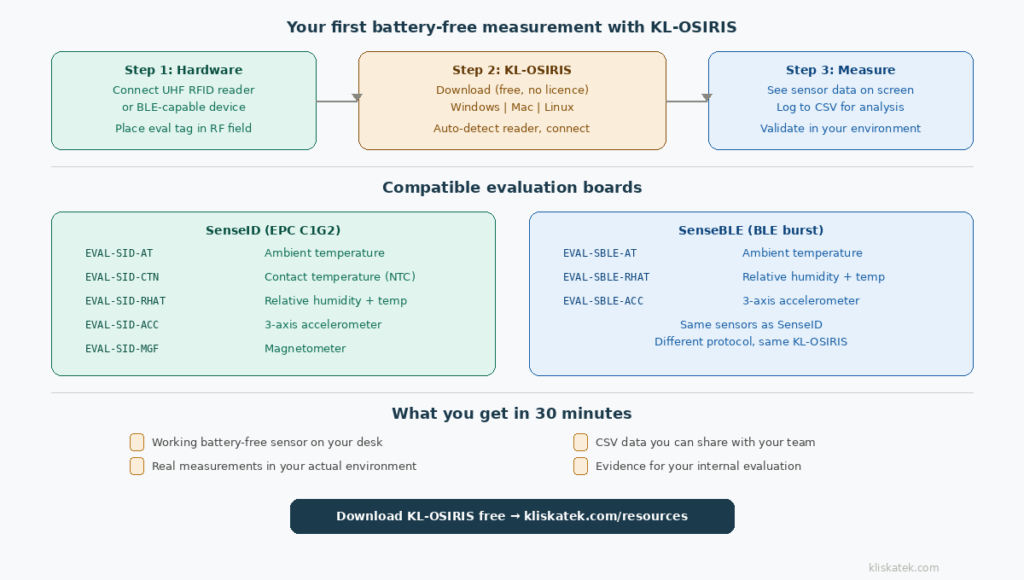
An evaluation tag. One of our SenseID or SenseBLE evaluation boards. Here’s the current lineup:
SenseID (EPC C1G2): EVAL‑SID‑AT (ambient temperature), EVAL‑SID‑CTN (contact temperature via NTC), EVAL‑SID‑RHAT (relative humidity + temperature), EVAL‑SID‑ACC (3-axis accelerometer), EVAL‑SID‑MGF (magnetometer).
SenseBLE (BLE burst): EVAL‑SBLE‑AT (ambient temperature), EVAL‑SBLE‑RHAT (relative humidity + temperature), EVAL‑SBLE‑ACC (3-axis accelerometer).
If you don’t have an evaluation tag yet, you can order starter kits from our SenseID or SenseBLE product pages.
A compatible reader. For SenseID tags: a commercial UHF RFID reader connected to your computer. KL‑OSIRIS works with major readers from Impinj, Zebra, Nordic ID and others supporting EPC C1G2. For SenseBLE tags: a UHF energy source (RFID reader or RF transmitter) to power the tag, plus any BLE-capable device to receive the beacons.
KL‑OSIRIS software. Download from our resources page. Free, no licence key, no registration. Available for Windows, Mac and Linux.
2) Step by step: SenseID (EPC C1G2)
Connect your reader. Plug your UHF RFID reader into your computer via USB or connect it over Ethernet, depending on the model. Make sure the reader antenna is connected and oriented so the tag will be in the RF field.
Launch KL‑OSIRIS. The software auto-detects connected readers. Select yours from the list and click Connect. If the reader is properly connected, you’ll see a green status indicator.
Place your evaluation tag. Position the SenseID eval board in front of the reader antenna. Start with about 30 cm distance — you can experiment with range later. The tag needs to be in the reader’s RF field to harvest energy.
Start reading. Click the Read button. KL‑OSIRIS sends a standard EPC C1G2 inventory command. The reader energises the tag, the tag powers up the sensor, takes a measurement, and sends the data back via backscatter. KL‑OSIRIS decodes the sensor data from the EPC or user memory and displays it on screen.
You should see the tag’s unique ID and the sensor reading — for example, 23.4 °C for an ambient temperature tag, or 45% RH + 22.1 °C for a humidity tag. The reading updates every time you trigger a new inventory cycle.
Log to CSV. Enable the logging function in KL‑OSIRIS to save every reading to a CSV file with a timestamp. This gives you a clean dataset you can analyse in Excel, import into your systems, or share with your colleagues.
3) Step by step: SenseBLE (BLE burst)
Set up the power source. Connect your UHF RFID reader or RF transmitter and position the antenna to create an RF field where the SenseBLE tag will be placed.
Place your evaluation tag. Position the EVAL‑SBLE board in the RF field. The tag will harvest energy and, once it has accumulated enough, fire a BLE advertising burst.
Receive the BLE beacon. KL‑OSIRIS can receive and decode the SenseBLE beacon if your computer has BLE capability (most modern laptops do). Alternatively, you can use any BLE scanner app on your smartphone to see the advertising packet — the sensor data is encoded in the beacon payload.
View the data. KL‑OSIRIS displays the tag ID and sensor reading from each burst. Because SenseBLE is event-driven (the tag emits when charged, not when asked), the reading frequency depends on the RF field strength and the tag’s energy accumulation time. In a strong field close to the antenna, you might see bursts every few seconds.
Log to CSV. Same as SenseID — enable logging and each burst gets recorded with a timestamp.
4) What to test first
Once you have live data flowing, here are the practical tests that matter for evaluation:
Range. Start close and move the tag away from the reader antenna in 10 cm increments. Note where the reading becomes intermittent and where it stops entirely. This gives you your working range in your specific environment — which will differ from our datasheet number because your environment has its own RF characteristics (metal surfaces, nearby electronics, orientation).
Sensor accuracy. Compare the tag’s temperature reading with a reference thermometer. For humidity, compare with a calibrated hygrometer. Our evaluation boards use calibrated digital sensors, but validating against your own reference equipment is always good practice.
Response to change. Hold the temperature tag in your hand for 30 seconds and watch the reading climb. Move the accelerometer tag and see the orientation values change. Blow on the humidity tag and watch the RH spike. This isn’t a formal test — it’s the moment where the technology stops being a datasheet and becomes something tangible you’ve experienced yourself.
Environmental factors. If your application involves specific conditions — cold environments, proximity to metal, particular orientations — test in those conditions. The lab bench is the starting point, not the finish line.
5) What to do with the data
The CSV file KL‑OSIRIS generates is your first piece of evidence. It contains timestamped sensor readings that you can use for several purposes:
Internal evaluation report. If you’re assessing whether battery-free sensing fits your application, the CSV data is the objective record of what you measured, at what range, under what conditions. This is more persuasive than any slide deck.
Share with colleagues. The CSV format is universal — anyone can open it, plot it, and draw their own conclusions. If you need to involve other people in the evaluation decision, the data speaks for itself.
Baseline for comparison. If you’re comparing battery-free sensors against your current monitoring approach (manual inspections, battery-powered sensors, wired systems), the CSV gives you a direct comparison dataset.
Input for a feasibility discussion. If the evaluation results are positive and you want to explore a custom solution for your specific application, the data from your KL‑OSIRIS tests is the starting point for a feasibility conversation with us. It tells us what worked, what the range looked like in your environment, and what conditions you need to support.
6) When things don’t work as expected
A few common situations and what they usually mean:
No reading at all. The tag isn’t getting enough energy. Move it closer to the antenna. Check that the reader is actually transmitting (most readers have an activity LED). Verify the antenna cable is connected and the antenna is oriented correctly.
Intermittent readings. You’re at the edge of the power transfer range. The tag is harvesting barely enough energy to power the sensor and communicate. Move the tag closer, increase the reader power if your reader supports it, or adjust the antenna orientation.
Reading seems wrong. For temperature, make sure the tag has had time to equilibrate — a tag that just came out of a cold shipment box will read low until it warms up to ambient. For humidity, the sensor needs airflow; if it’s inside a sealed bag, the reading reflects the bag’s microclimate, not the room.
Reader not detected by KL‑OSIRIS. Check your USB/Ethernet connection. Some readers require specific drivers — check the reader manufacturer’s documentation. If you’re using Ethernet, verify the reader’s IP address is reachable from your computer.
If you’re stuck, reach out to us. We’d rather spend ten minutes helping you get a working measurement than have you abandon the evaluation because of a cable issue.
7) What comes next
If the evaluation goes well — you see reliable readings at a useful range in conditions that resemble your application — the natural next steps are:
More extensive testing. Run KL‑OSIRIS for longer periods, in different locations within your facility, under different environmental conditions. The CSV logging makes it easy to accumulate data over days or weeks without any manual effort.
Custom application development. If you want to integrate sensor data into your own systems rather than using KL‑OSIRIS, the SENSEID SDK provides .NET and Python libraries with full documentation. Next week’s blog post will cover the SenseID evaluation board family in detail.
Feasibility discussion. If you’ve validated the concept and want to explore a custom solution — a different sensor, a specific form factor, an optimised antenna for your environment, integration with your enclosure — contact us to discuss a feasibility study. The data from your KL‑OSIRIS evaluation is the perfect starting point for that conversation.
Download KL‑OSIRIS: kliskatek.com/resources/kl-osiris
Order evaluation tags: SenseID | SenseBLE
Next week: “SenseID Evaluation Guide: EPC C1G2 Tags for Temperature, Humidity, Acceleration & More” — a deeper look at each SenseID evaluation board and what it measures.